
This article explains how to add a new unit to an Online Travel Agency (OTA) and connect it to rezStream Cloud using rezStream Channels so that rates, restrictions, and availability stay synchronized.
Step 1: Add the Unit to the OTA
- Log in to your OTA account (e.g., Booking.com, Expedia, Airbnb, or VRBO).
- Create the new unit listing in the OTA, completing all required fields such as unit name, type, and description.
-
Confirm the unit is active in your OTA account.
Step 2: Connect the Unit in rezStream Channels
-
In rezStream Cloud, go to the Integrations tab and select rezStream Channels.
-
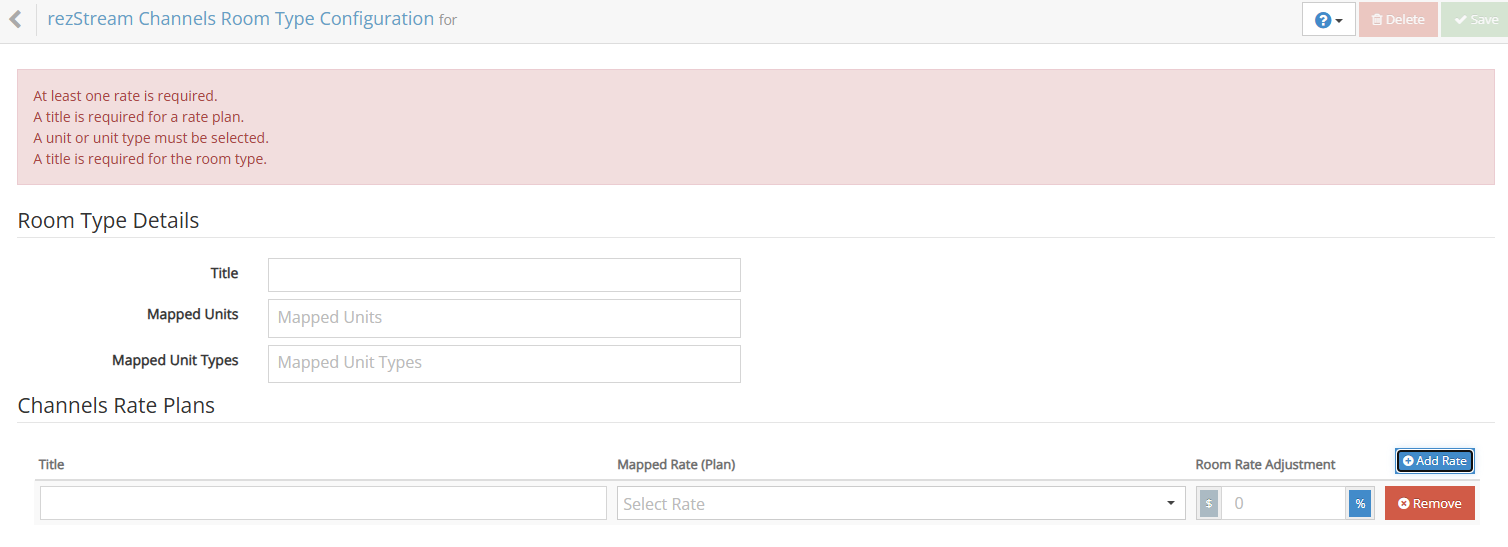
In the Units tab, click Add New Channel Unit Type. This option is used when the unit has already been created in rezStream Cloud and is ready to be mapped to a connected channel.
- Click on the Channels tab.
- Locate the channel where you added the new unit, then click the Actions drop-down and select Edit.
- Navigate to the Mapping tab.
- Find the new unit from the OTA and map it to the corresponding rezStream unit.
- Click Save to apply your changes.
Step 3: Run a Full Sync
-
Return to the Channels tab.
-
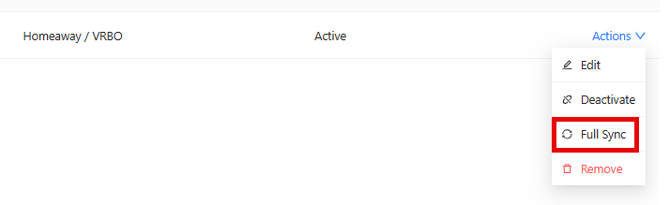
From the channel’s Actions drop-down, select Full Sync.
-
This pushes updated rates, restrictions, and availability for the new unit to the OTA immediately. Allow a few minutes for the OTA to reflect the changes on their platform.
-
Notes
-
Prerequisite: A unit must exist in both the OTA and rezStream Cloud before it can be mapped and connected.
-
Mapping ensures that rates, restrictions, and availability are kept in sync between rezStream and the OTA.
-
If the new unit does not appear in rezStream Channels after adding it to the OTA, wait a few minutes and refresh the page. If the issue persists, contact rezStream Support for assistance.