
Learn how guests find you and why they're visiting, so you can see which advertising works and who your guests are.
Time needed: about 5 minutes
What's the difference?
Source is how the guest heard about your property, such as a newspaper ad, Google or a friend.
Reason is why the guest is staying with you, such as business, a wedding or a family vacation.
Part 1: Add a Source option
Create the choices your staff and guests can pick from for "How did you hear about us?"
1Open Configuration
Click Configuration.

2Open Source and Reason settings
Under the Customization section, click Source of Contact and Reason for Stay.
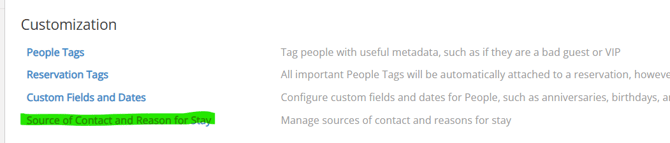
3Make sure you're on the Sources tab
At the top of the screen, there are two tabs: Sources and Reasons. The tab you're on is highlighted in blue. Click Sources if it isn't already highlighted.

4Click Add New Source
Click Add New Source in the top right corner of the screen.

5Name it and save
In the Label box, type the name of the source, such as Newspaper.
Want guests to be able to pick this option when they book online? Set Selectable on the Booking Engine to Yes.
Click Save Source in the top right corner.

Part 2: Add a Reason option
Adding a Reason works the same way, starting from the same screen.
6Switch to the Reasons tab
Click the Reasons tab at the top of the screen.

7Click Add New Reason
Click Add New Reason in the top right corner of the screen.

8Name it and save
In the Label box, type the reason, such as Business.
To let guests pick this option when they book online, set Selectable on the Booking Engine to Yes.
Click Save Reason in the top right corner.

✓You're done!
Your new options are ready to use. Repeat these steps to add as many Sources and Reasons as you need.
Where you'll use these
Source of Contact can be added in two places: on the guest's record (find the guest in the People tab) or on a reservation, in the Notes and Details section.
Reason for Stay can only be added on a reservation, also in the Notes and Details section.
Still need help?
Call us at 303-872-0220 x 2 or send us a support request. We're happy to walk you through it.
Related articles