Follow the steps below to create a new package in rezStream Cloud.
Create a Package
- Navigate to Configuration > Packages
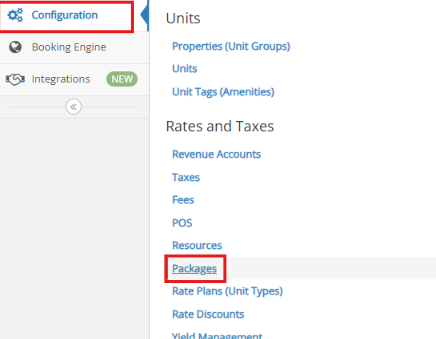
- Select Add New Package

- You’ll be directed to the General tab. Here, enter a Name for your package.

- Click on Description tab and add description of package in box below.

Add Items to the Package
- Click General Tab and Select Add Item.

- Use the Search for Item... box to find the POS items you want to include. You will need to type part of the item name to display it

- For each item you add, set the following:
- Price
- Charge Type (one-time or daily)
- Toggle On Apply per Guest, if applicable.

- Click Save Item for each item.
- After all items have been added, select Save Package.

Make Packages Available on the Booking Engine
If you want to make the packages available for online purchase:
- Open the package and toggle Allow on the Booking Engine? to enable it on the booking engine.
- Click Save Package in the upper right corner.

- Go to Booking Engine > Settings.
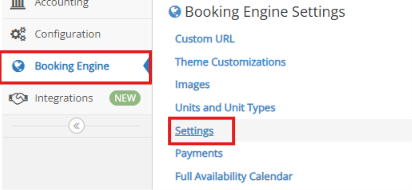
- Toggle Sell Packages Online to enable it on the booking engine.

- Click Save Configuration.
Packages will appear as Enhancements in the Booking Engine.
