
Is rezStream Cloud running slowly? Turning off your computer's automatic proxy settings can help.
Time needed: about 3 minutes, plus a restart
Why this helps
Some anti-virus or other software can change your proxy settings when they're set to "automatically detect," and this can slow down rezStream Cloud.
These steps are done in Windows Settings on your computer, not in rezStream Cloud.
Turn off automatic proxy settings
1Open Settings
Open the Start menu (or Cortana), search for Settings, and open it.
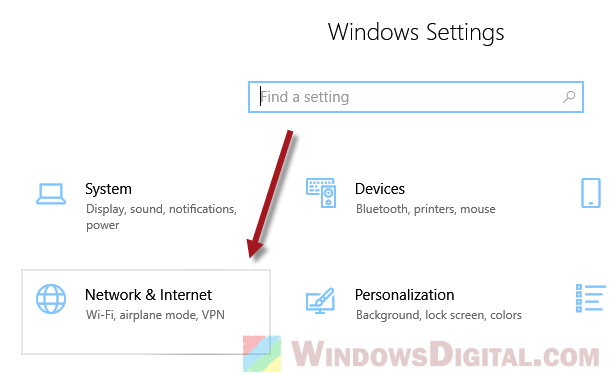
2Click Network & Internet
Click Network & Internet.
3Click Proxy
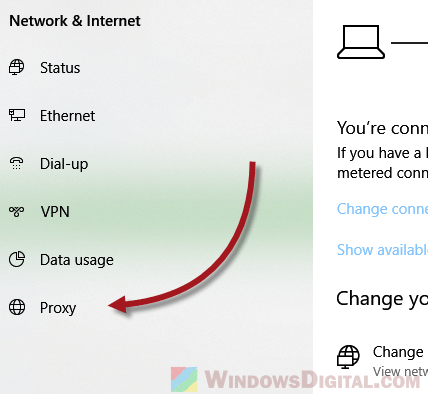
In the left pane, click Proxy.
4Turn off Automatically detect settings
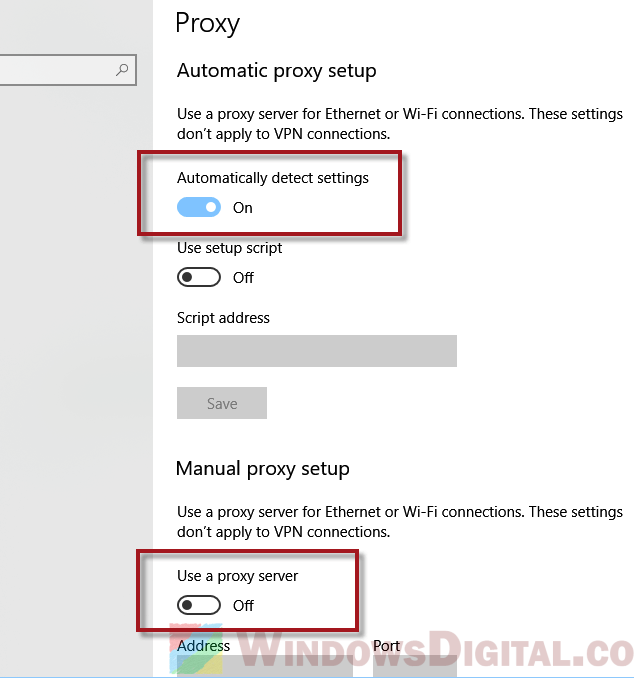
Under Automatic proxy setup, turn off Automatically detect settings.
5Turn off Use a proxy server
Under Manual proxy setup, turn off Use a proxy server.
6Restart your computer
Close the Settings window and restart your computer.
✓You're done!
Once your computer restarts, open rezStream Cloud again.
Still need help?
Call us at 303-872-0220 x 2 or send us a support request. We're happy to walk you through it.
Related articles