
Overview
Several pricing tools in rezStream can affect the total cost of a reservation. These tools are designed to support different pricing strategies, promotions, and packages.
When availability is searched, rezStream evaluates these pricing rules and displays all rate plans that are configured as Bookable and meet the search criteria.
It is important to understand that:
- Guests may see multiple rate options for the same room
- Each rate option represents a different rate plan
- Only one rate plan can be selected for a reservation
- Packages and discounts follow the rules of the selected rate plan
Because of this structure, pricing options do not combine or stack together automatically.
Yield Management is applied separately and adjusts all daily rates before rate plans are evaluated.
How Rate Plans Are Evaluated
When a guest searches availability, rezStream evaluates pricing in a consistent sequence.
Yield rules are applied automatically based on occupancy and booking window conditions.
|
Evaluation Step |
What Happens |
|
Base Rate |
The room’s base (daily, rack, nightly) rate provides the starting nightly price |
|
Yield Management |
If enabled, yield rules may adjust all daily rate plans |
|
Rate Plans |
Rate plans are evaluated based on their configured pricing rules |
|
Packages |
Rate plans may include a default package |
|
Booking Engine |
All qualifying rate plans marked as Bookable are displayed |
Each qualifying rate plan appears as a separate booking option.
The system does not automatically choose a rate plan. Guests select the rate they want to book.
When Multiple Rates Qualify
It is normal for several rate plans to qualify for the same dates. When this happens, the Booking Engine displays each option separately.
For example:
|
Rate Option |
Why It Appears |
|
Rack Rate |
Base room rate for the property |
|
AAA Rate |
Discount rate plan configured for AAA members |
|
Senior Rate |
Rate plan configured for senior travelers |
|
Stay & Save |
Rate Discount configured with a promo code |
|
Beach Wedding Special |
Rate plan that includes a package |
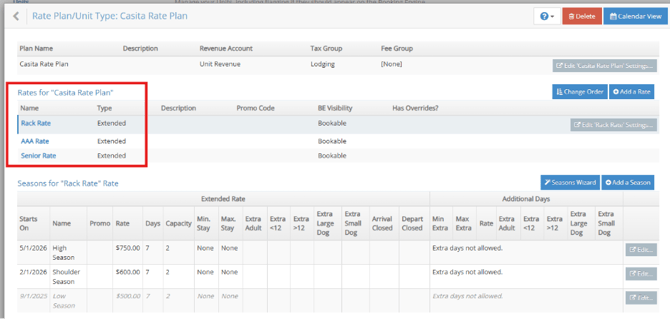
Multiple rate plans may qualify for the same dates. Each appears as a separate booking option.
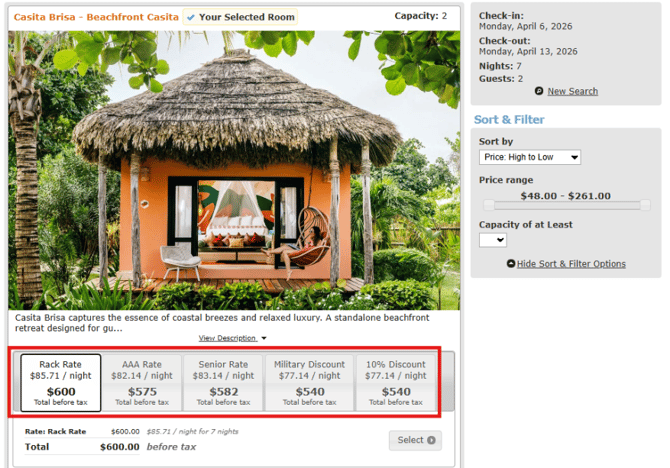
Each option may have different pricing rules, restrictions, or included items.
Guests choose the rate plan that best fits their needs.
Packages and Rate Plans
Packages can be attached to a rate plan using a Default Package.
When a guest selects a rate plan with a default package:
- The package is automatically included in the reservation
- The package appears as a separate line item in the pricing breakdown
For example, a reservation may display:
|
Line Item |
Example |
|
Room Nights |
4 nights × $200 |
|
Package |
Elopement Package |
|
Fees |
Booking or service fees |
|
Taxes |
Calculated based on the reservation |
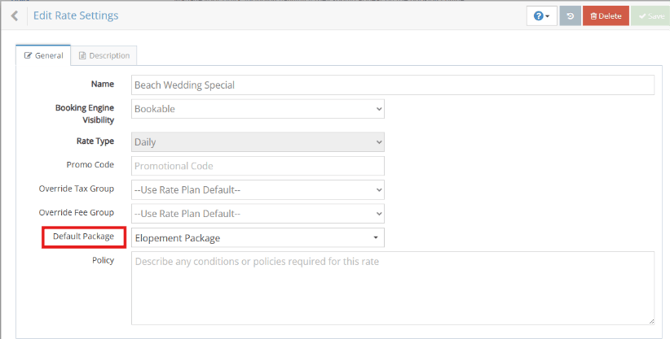
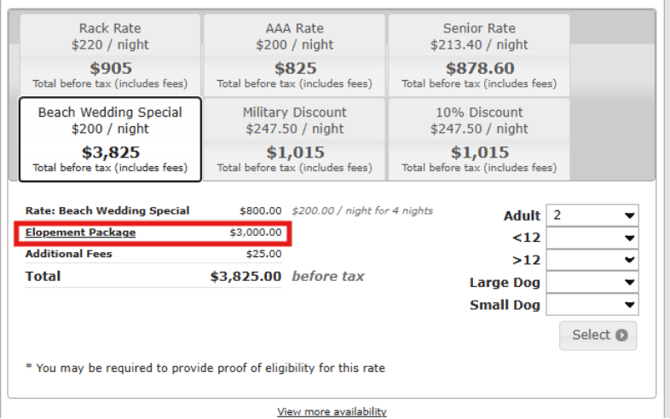
Even though the package is built into the rate plan, the Booking Engine displays it separately, so guests can see what is included in the total price.
Promo Codes and Discounted Rates
Promotions in rezStream can be configured in different ways.
Some promotions appear as separate rate plans, such as a discounted rate option. In this case, the guest simply selects that rate plan.
Other promotions may require a promo code to reveal a specific rate plan. Promo codes only apply when the selected rate plan meets the promotion’s eligibility requirements.
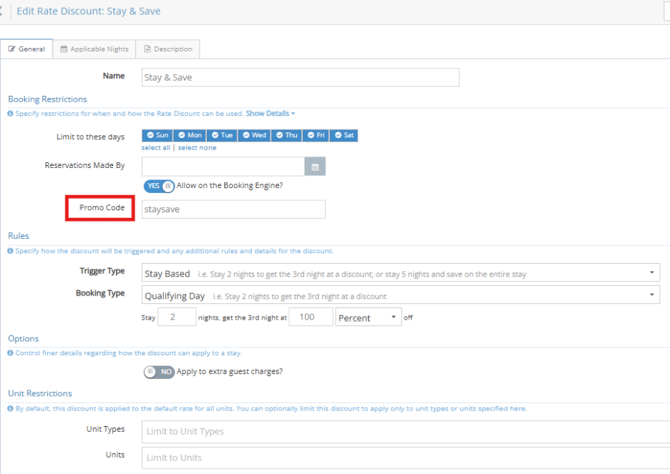
Because each rate option is its own rate plan, promotions and discounts do not stack together. Guests select the rate plan they want to book.
Yield Management and Rates
Yield Management adjusts daily rates based on occupancy rules.
For example, the system may lower the daily rate when occupancy is below a set threshold or increase it when occupancy is high.
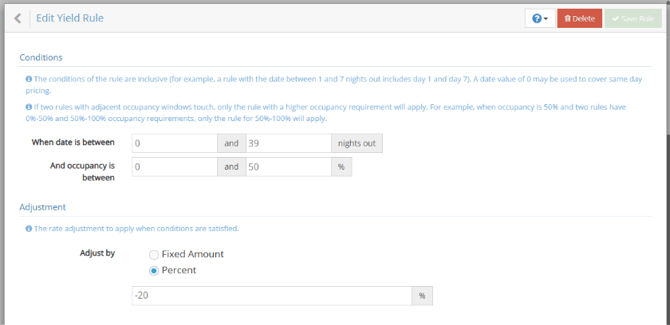
These adjustments are applied automatically and affect daily rates across all booking channels, including the PMS, Booking Engine, and connected channels such as OTAs.
Yield adjusts all daily rates based on configuration. Extended rates are not affected. As a result, guests may see daily rates change while other rate options stay the same.
How Yield Management Affects Discounts
Yield Management may affect how discounts are applied.
- When yield lowers the daily rate, that lower rate is not used to calculate discounts
- When yield raises the daily rate, discounts may still apply afterward
Because of this, discounts may not behave the same way depending on whether rates are increasing or decreasing.
Multiple Yield Rules
If multiple yield rules apply to the same dates, all matching rules will be applied.
This may result in larger rate changes than expected if rules overlap.
Why the Price May Look Different Online
Guests may see different prices for the same room because they are viewing different rate plans.
For example:
- A guest may select a discounted rate plan
- A rate plan may include a package
- Yield management may adjust the daily rate
- Different rate plans may have different pricing rules
Because each rate plan represents a separate pricing option, the final price depends on the rate plan the guest chooses.
Where to Verify Rate Rules
If a reservation price looks unexpected, reviewing a few details usually explains how the rate was calculated.
|
If You See |
What to Check |
Where to Check |
|
Unexpected price |
Selected rate plan and pricing rules |
Configuration → Rate Plans / Unit Types → Rate Plan → Seasons |
|
Promo code not applying |
Promo code eligibility and requirements |
Configuration → Rate Discounts → [Discount Name] |
|
Package included in price |
Rate plan and default package settings |
Configuration → Rate Plans / Unit Types → Rate Plan → Edit Rate |
The Selected Rate on the reservation identifies which rate plan was used.
When to Contact Support
Contact rezStream Support if the pricing still appears incorrect after reviewing the rate plan and configuration.
When contacting support, include:
- Reservation example or booking details
- Dates searched or booked
- Rate plan selected
- Promo code used (if applicable)
- Screenshots of the pricing shown
Providing this information helps support quickly review the rate configuration and confirm how the reservation price was calculated.
Related Articles
Why Prices Look Different Across rezStream Cloud, Booking Engine, & OTAs