
Overview
Pricing for the same room may appear different between rezStream Cloud, the Booking Engine, and online travel agencies (OTAs). When the same rate plan and conditions are used, prices align. Differences can occur when rate plans, packages, promotions, fees, or channel-specific settings affect how pricing is calculated or displayed.
rezStream Cloud is where your property's rates, rate plans, availability, and booking rules are configured. The Booking Engine evaluates that information when displaying prices to guests, while OTAs (when using rezStream Channels) receive base rates and availability but apply their own taxes, fees, promotions, and display rules.
This article explains common reasons prices may differ and where to verify pricing across systems.
How Pricing Starts in rezStream Cloud
rezStream Cloud is where your property's core pricing configuration is managed, including:
- Rate plans
- Availability
- Restrictions
These settings determine the base pricing and availability used for reservations.
If yield management rules are enabled, daily rate plans may be automatically adjusted based on occupancy or booking window conditions.
During the booking process, additional adjustments—such as packages, fees, promotions, or selected rate plans—may also affect the final price shown to the guest.
Note: The base rate name is defined by the property. It may appear as Standard Rate, Rack Rate, Daily Rate, or another label depending on the property’s configuration.
How the Booking Engine Determines the Displayed Price
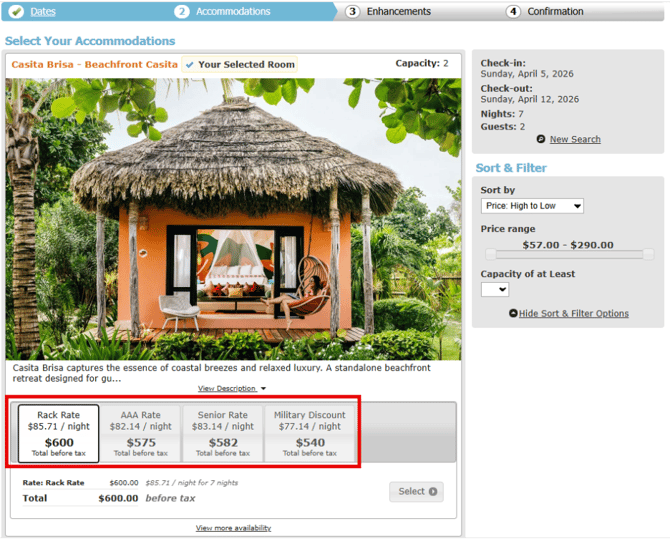
The Booking Engine evaluates rezStream Cloud data and determines which rate plans qualify for the selected dates before displaying prices to guests. Multiple rate plans may qualify for the same dates, and the Booking Engine displays each eligible option separately.
The displayed price may differ from the Occupancy Map when:
|
Possible Cause |
What It Means |
|
Different rate plan selected |
A package rate plan or alternate rate plan applies |
|
Promo code applied |
A qualifying discount adjusted the rate |
|
Different occupancy selected |
Extra person pricing may apply |
|
Package rate plan used |
A bundled rate changes the nightly price |
The Occupancy Map shows the base rate configured in rezStream Cloud, while the Booking Engine displays all rate plans that qualify for the selected dates and booking conditions.
How OTAs Display Pricing
When using rezStream Channels, OTAs receive base rates and availability from rezStream Cloud. Each OTA controls how pricing is displayed on its platform.
Differences may occur because OTAs manage:
- Taxes
- Channel fees- Extra person, cleaning, pet
- Promotions created in the OTA extranet
- Rounding rules
- Price display formatting
Because of these channel-controlled elements, OTA pricing may appear different from both rezStream Cloud and the Booking Engine.
Some properties may also configure channel-specific rate adjustments in rezStream Channels to increase or decrease the base rate sent to OTAs.
Note - Properties managing OTA connections outside of rezStream Channels should review their channel settings directly in the OTA extranet.
Common Reasons Prices Look Different
The following situations account for most pricing questions.
|
Situation |
Most Likely Cause |
|
Booking Engine price differs from Occupancy Map |
A different rate plan or promotion is applied |
|
OTA price is higher than Booking Engine |
Channel taxes, fees, or channel rate adjustment |
|
OTA price is lower than Booking Engine |
Channel promotion or channel rate adjustment |
|
Total price appears higher than expected |
Packages or add-ons applied |
|
Small cents differences |
Rounding differences between systems |
|
Rates changed unexpectedly |
Yield management rule adjusted the daily rate plan based on occupancy |
These differences usually reflect configuration or channel behavior rather than an error.
What Each System Controls
|
Pricing Element |
rezStream Cloud |
Booking Engine |
OTAs |
|
Base rates |
Configured in rezStream Cloud |
Uses rates from rezStream Cloud |
Receives base rates from rezStream |
|
Availability |
Controlled in rezStream Cloud |
Evaluated for booking |
Receives availability updates from rezStream |
|
Rate plans |
Configured in rezStream Cloud |
Evaluates qualifying plans |
Only base rates are sent to OTAs |
|
Packages |
Configured in rezStream Cloud |
Applied through rate plans or added during booking |
Must be configured and managed in OTA extranet |
|
Point of Sale Items |
Configured in rezStream Cloud |
Offered as optional add-ons during booking |
Not supported / not sent to OTAs |
|
Promo codes |
Configured in rezStream Cloud |
Applied when entered |
Must be configured and managed in OTA extranet |
|
Taxes |
Configured in rezStream Cloud |
Calculated during booking |
Must be configured and managed in OTA extranet |
|
Property fees (extra person, cleaning, pet, etc.) |
Configured in rezStream Cloud |
Applied during booking |
Must be configured and managed in OTA extranet |
|
Channel fees / commissions |
Not controlled |
Not applicable |
Controlled by OTA |
Where to Verify Pricing
If a price appears different across systems, review the following areas.
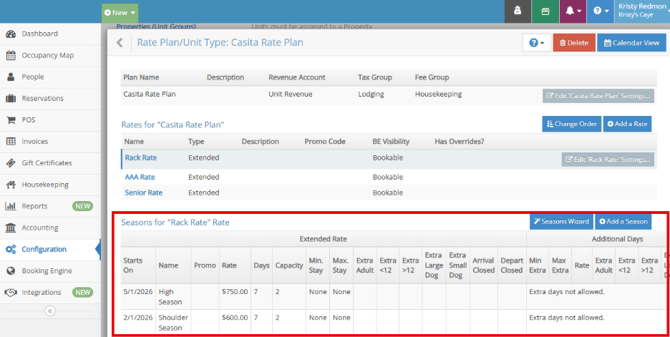
1. Confirm the Base Rate in rezStream Cloud
Check the configured rate plan and season pricing.
Configuration → Rate Plans / Unit Types → Rate Plan → Seasons
2. Verify the Rate Plan Used in the Booking Engine
Confirm whether:
-
A package rate plan was selected
-
A promo code was entered
- Occupancy changed the rate
These factors affect the price displayed online
3. Review OTA Settings (If Comparing Channel Prices)
If comparing an OTA price, review both the OTA extranet and rezStream Channels configuration.
Check for:
- Channel promotions configured in the OTA extranet
- Taxes or service fees configured in the OTA extranet
-
Channel rate adjustments configured in rezStream Channels (rate increase or decrease applied before sending rates to the OTA)
-
Integrations → rezStream Channels → Channels → Actions → Edit → Channel Settings → Derived Rate Settings → Rate Logic
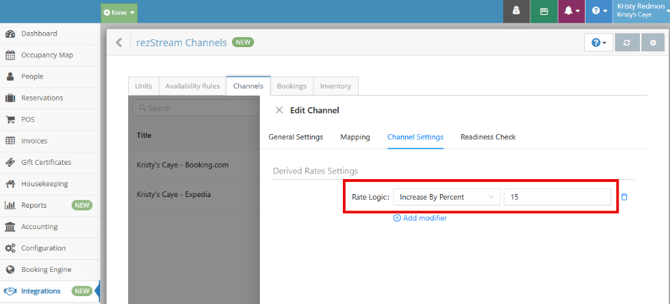
These settings can affect the final price displayed to guests on the channel.
When to Contact Support
Contact Support if:
- The displayed rate does not match the configured rate plan for the selected dates
- OTA prices differ after channel configuration has been verified
- Rates appear incorrect across all systems
When contacting Support, include:
- Property name
- Room or Room type
- Arrival and departure dates
- Screenshots of the prices being compared
- The rate plan used
Providing this information allows the pricing setup to be reviewed quickly.
Related Articles
How Rate Rules Work in rezStream
How the rezStream Booking Engine Works (End-to-End)
How Channel Sync Works in rezStream Channels