
- Navigate to the Configuration tab and select Payment Settings
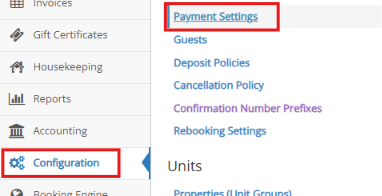
- Click on the Credit Card Processing tab.
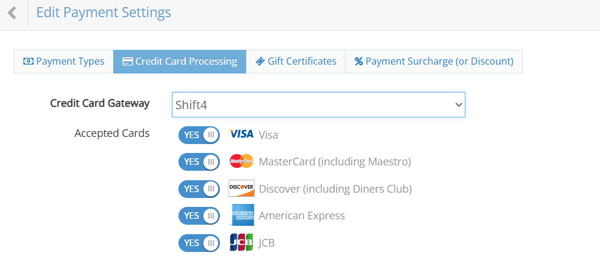
- Credit Card Gateway: Confirm it is set to Shift4.
- Accepted Cards: Visa, MasterCard (including Maestro), Discover (including Diners Club), American Express, JCB.
- The Accepted Cards settings under the Credit Card Processing tab allow you to enable or disable specific card types accepted by your gateway.
Please note: disabling a card type here only affects transactions processed through the payment gateway. It will not automatically remove that card type as an option on your booking engine.
To fully block a card type across both your property and online booking engine, you’ll need to contact Nexio Support and have that card type removed completely.
- The Accepted Cards settings under the Credit Card Processing tab allow you to enable or disable specific card types accepted by your gateway.
- Accepted Currency: Set to USD (must match your merchant account).
- API Credentials: Enter the rezStream Cloud PMS Authorization Token (provided by Shift4) in the Shift4 Authorization Code field.
 If you are using a Shift4 PAX A800 Terminal, click here to learn how to pair and enable your new terminal.