
Before Comparing Reports
When two reports do not match, start by asking:
- Are the reports measuring the same activity?
- Are they using the same date range?
- Are they organizing the information differently?
- Is one report showing activity during a period while another shows balances as of a specific date?
The sections below explain several common examples.
Sales Reports vs Revenue Reports
Although both report categories may include reservation dollars, they answer different questions.
|
Report Type |
Question Answered |
|
Sales Reports |
What was booked during this period? |
|
Revenue Reports |
What revenue was earned during this period? |
Example
A guest books a reservation on June 24 for a stay beginning December 10.
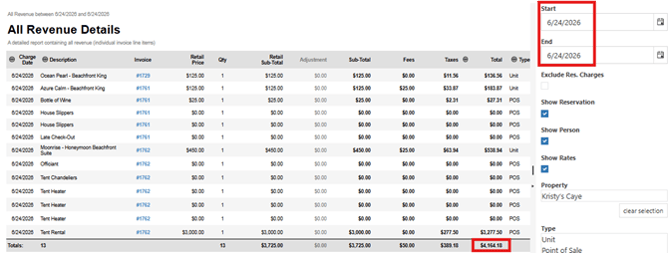
When both reports are run for June 24, the reservation appears in the All Sales Details report because it was booked that day. It does not appear in the All Revenue Details report because no revenue has been earned yet.
The reservation will appear in Revenue reports during the stay when the room revenue is earned.
Because Sales and Revenue reports measure different events, their totals are not expected to match.

Revenue Reports vs Payment Reports
Although both reports involve money, they answer different questions.
|
Report Type |
Question Answered |
|
Payment Reports |
How much money was collected? |
|
Revenue Reports |
How much revenue was earned? |
Example
A guest books a future reservation and pays a deposit today.
Payment reports show the deposit on the date it was collected.
Revenue reports show room revenue during the stay dates when the revenue is earned.
Because they measure different events, these reports are not expected to match.
Revenue Reports vs Revenue on Departure Reports
Although both report categories contain revenue information, they answer different questions.
|
Report Category |
Question Answered |
|
Revenue Reports |
What revenue occurred during the selected date range? |
|
Revenue on Departure Reports |
What revenue is associated with guests who departed during the selected date range? |
Example
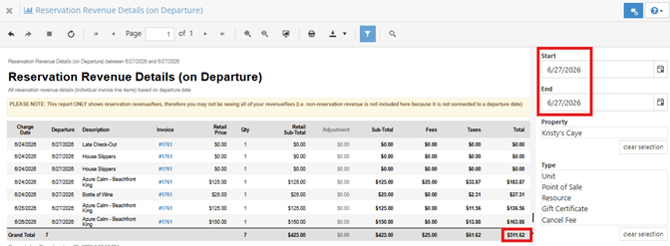
A Revenue report for June 27 includes revenue earned on June 27, including revenue from guests arriving, staying over, and departing that day.
A Revenue on Departure report for June 27 only includes revenue associated with guests who departed on June 27. The report displays the revenue for the entire stay, even if some charges occurred on earlier dates.
Because the reports include different reservations and different revenue activity, the totals are not expected to match.

Why Financial Audit and Advance Deposits Show Different Totals
Although both reports contain advance deposit information, they answer different questions.
|
Report |
What It Shows |
|
Financial Audit |
Advance deposit activity during the selected date range |
|
Advance Deposits |
Advance deposit balances being held as of a specific date |
Example
An accountant requests advance deposit information for the month of April.
The Financial Audit report summarizes advance deposit activity from April 1 through April 30.
The Advance Deposits report shows the advance deposit balance being held as of April 30.
In the example below, both reports relate to advance deposits, but the totals are different because they measure different information.

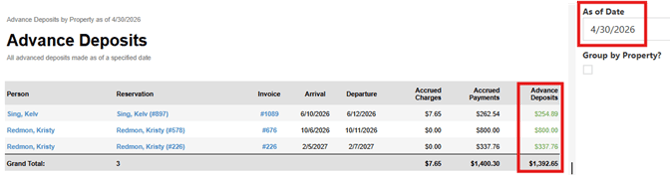
Remember: The Advance Deposits report is an "as of" report. Advance deposit balances change as guests arrive, deposits are applied to reservations, refunds are processed, and reservations are canceled. Because the balance is continually changing, it is not expected to match the Financial Audit for the same date range.
How Revenue Dates Affect Report Totals
Different types of charges are reported using different dates. The table below shows the revenue reporting date typically used for each type of charge.
|
Charge Type |
Revenue Reporting Date |
Examples |
|
Room Revenue |
Stay Date |
Nightly room charges |
|
POS Items Added Before Arrival |
First Stay Date |
Gift shop item, rental, or guest service added before check-in |
|
POS Items Added During a Stay |
Date Added |
Wine, firewood, bicycle rental, late checkout, equipment rental, parking pass, or other guest services added during the stay |
|
One-Time Packages |
First Stay Date |
Romance package, breakfast package |
|
Daily Packages |
Each Stay Date |
Daily meals, daily parking, daily resort package |
|
Default Fees |
First Stay Date |
Cleaning fee, resort fee, pet fee configured as a fee |
|
Fees Added During a Stay (Configured as POS items) |
Date Added |
Additional cleaning fee, pet fee, damage fee, or parking fee manually added during the stay |
|
Credit Card Surcharges |
Payment Date |
Automatically calculated credit card surcharge |
Because different charge types may use different dates, activity from the same reservation can appear on different dates within reports. In some cases, revenue may appear in reports before payment has been collected.
How Packages Appear in Revenue Reports
Packages are made up of one or more Point of Sale (POS) items.
In detailed Revenue reports, package components appear as individual POS items rather than as a single package charge. The Package column identifies which package each POS item belongs to.
How package revenue appears in Revenue reports depends on how the package is configured:
- One-Time Packages appear on the first stay date.
- Daily Packages appear on each stay date, similar to nightly room revenue.
Package Revenue reports summarize package revenue, while detailed Revenue reports display the individual POS items that make up each package.
Suggested Screenshot: Reservation invoice showing the package compared to All Revenue Details, highlighting the individual POS items and the Package column.
Reports That Commonly Reconcile
The following reports commonly reconcile when using the same date range and filters.
|
Report Comparison |
Why |
|
All Revenue by Type and All Revenue Details |
Same revenue, different levels of detail |
|
Taxes by Individual Tax and tax totals in All Revenue reports |
Reporting the same tax activity |
|
Package Revenue and detailed revenue reports |
Same revenue, organized differently |
Reports That Commonly Differ
|
Report Comparison |
Reason |
|
Sales Reports and Revenue Reports |
Booking date vs stay/revenue date |
|
Revenue Reports and Payment Reports |
Revenue earned vs payments collected |
|
Revenue Reports and Revenue on Departure Reports |
Revenue date vs departure date |
|
Financial Audit and Advance Deposits |
Activity during a period vs balances as of a date |
Troubleshooting Report Differences
When comparing reports, review:
✅ Date range
✅ Report purpose
✅ Revenue reporting dates
✅ Point of Sale (POS) activity
✅ Package configuration
✅ Filters
Most reporting differences can be explained by understanding what each report is designed to measure and how the information is organized.