
Create a pet fee and either add it automatically to pet-friendly bookings, or let guests add it themselves when they book.
Time needed: about 20 minutes
First, choose how to charge the pet fee
| Option 1: Default Package | Option 2: Add-On Package |
|---|---|
|
|
Both options start the same way. Follow the steps below.
On this page
Part 1: Create a Pet Fee POS item
Before you create the package, set up your pet fee as a Point of Sale (POS) item. See Set up Point of Sale Items.
Part 2: Create a Pet Fee package
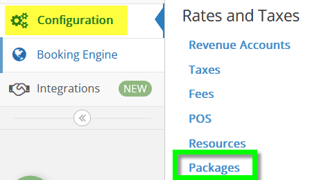
- Go to the Configuration tab and click Packages.
- Click Add New Package.

- Enter a clear name for the package. Guests see this name on the Booking Engine and on their invoice.
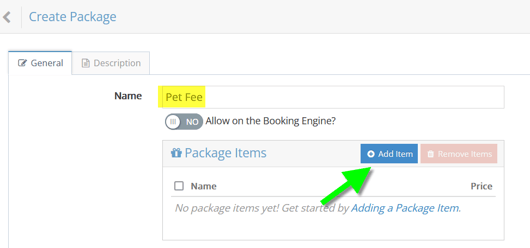
- Click Add Item.
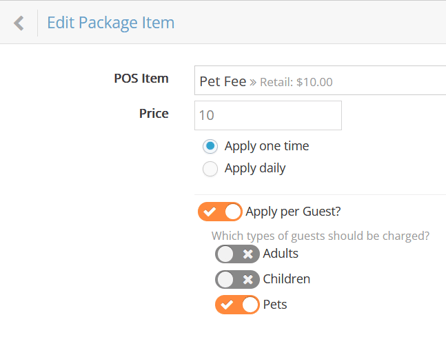
- In the Search for Item... box, type Pet Fee and choose the correct item from the drop-down list.

- Set the Price, and choose Apply One Time or Apply Daily. Turn on Apply per Guest if you'd like. Then click Save Item in the upper right corner.
Part 3: Set the package options
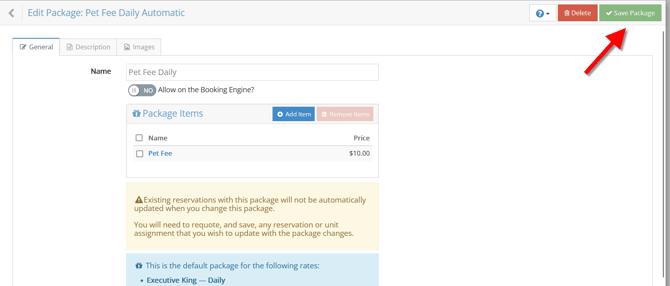
- Set Allow on Booking Engine to Yes only if this package should not be included by default in a rate plan (Option 2).
- Click Save Package in the upper right corner.
Using Option 1? See Adding a Default Package to add this package to your rate plan.
Part 4: Tag your pet-friendly units
To make pet-friendly units easy to spot, create amenity tags such as "Pet Friendly" or "No Pets Allowed," and add them to the right units.
You're done! Your pet fee is set up.
Still need help?
Call us at 303-872-0220 x 2 or send us a support request. We're happy to walk you through it.
Related articles